
Restaurant & food shop software
Bills from a photo menu, QR ordering at the table, a kitchen screen, the waiter’s phone, the bazar and the day’s profit — in one place.
7 days free, no card · from ৳1,500 a month
Does this sound familiar?
- Orders shouted to the kitchen get mixed up and run late
- You know the day’s sales, but not what the bazar cost or what was earned
- Hard to keep track of which table still owes and which waiter has it
How it works — from the order to the day’s profit
How one order travels from the table to the kitchen, to the bill and into the day’s report. Every picture below is a real screen of the software (demo data).
-
1
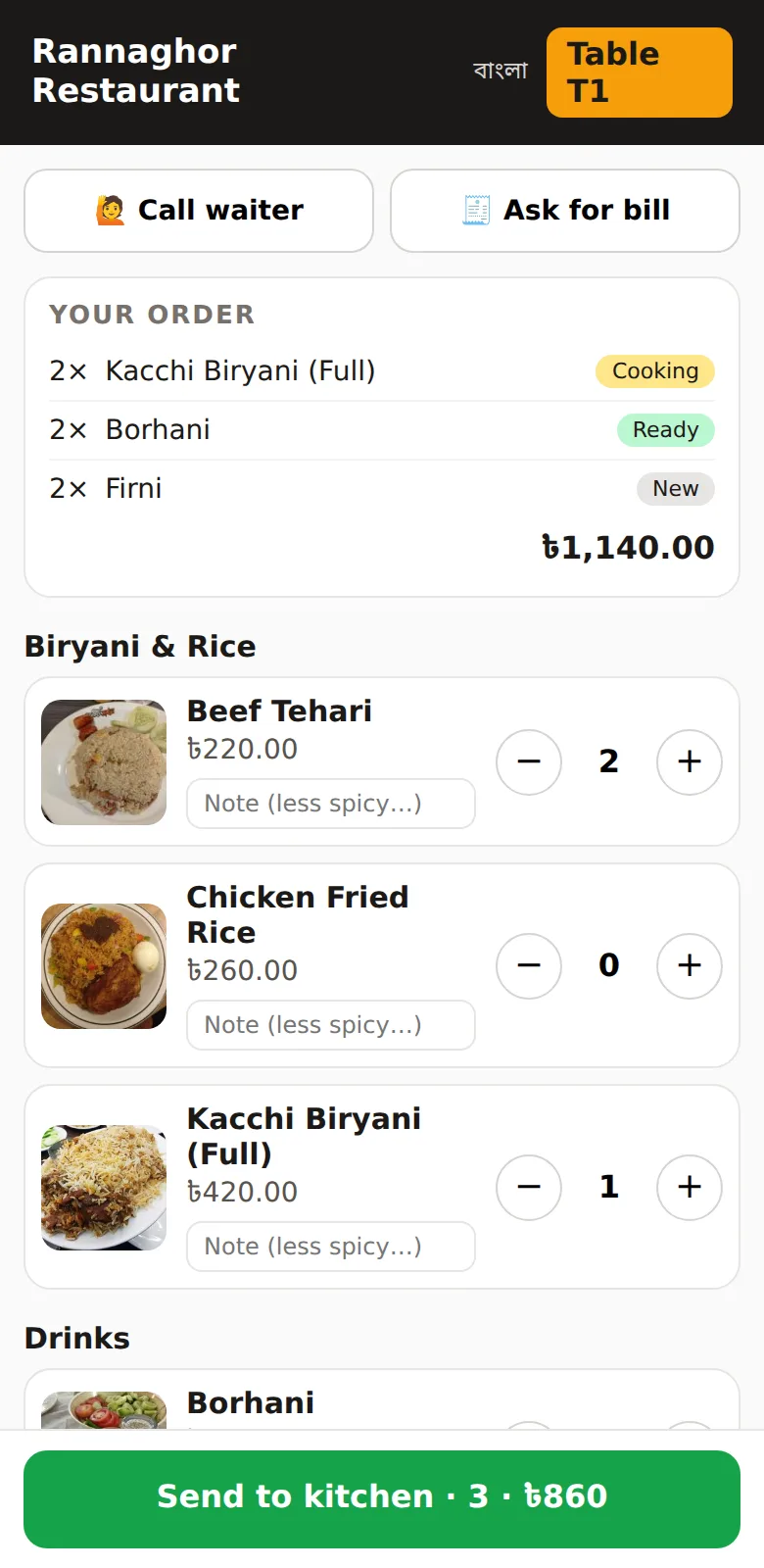
The guest scans the table QR and orders
Every table has its own QR code. Scanning it with the phone camera opens the photo menu — no app. The guest picks dishes, taps “Send to kitchen”, can add a note like “less spicy”, and watches on the same page which dish is cooking and which is ready.
-
2
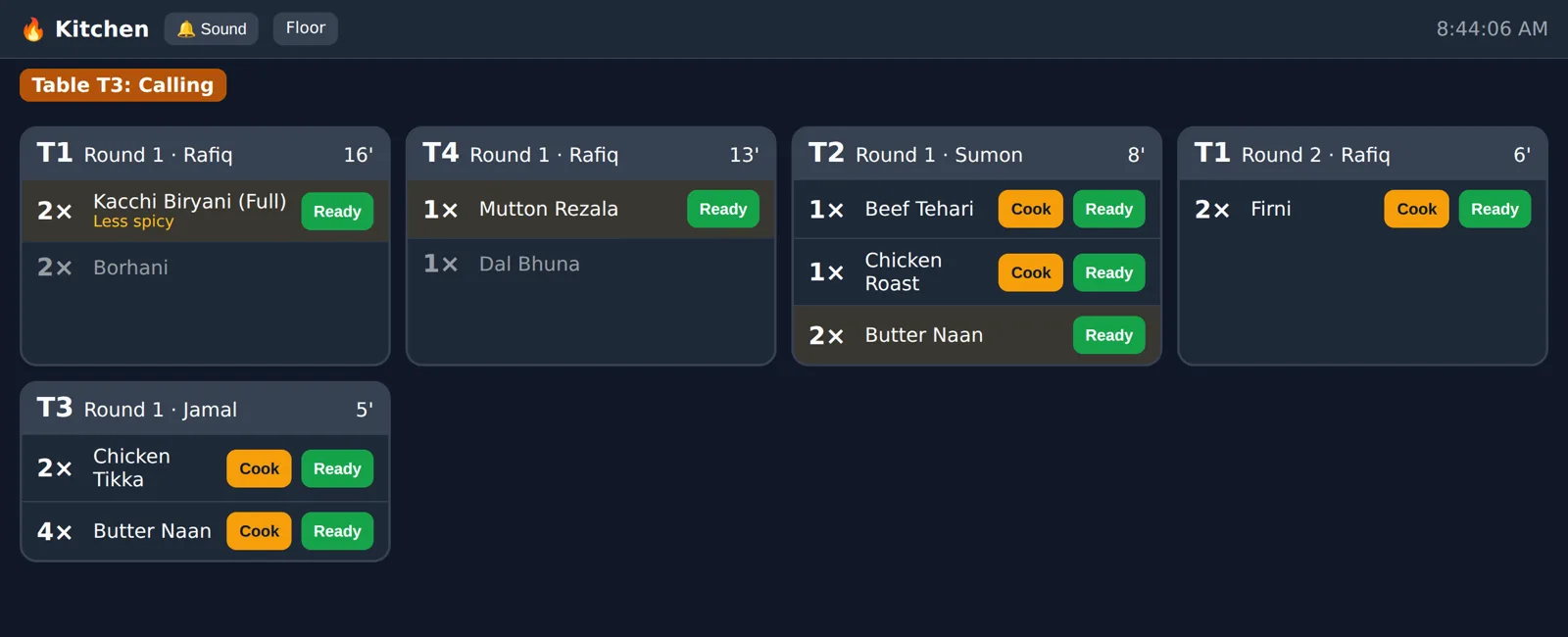
The order lands on the kitchen screen at once
A beep announces each new order. Every table’s ticket shows the dishes, quantities, notes and how many minutes it has waited. The cook taps “Cook” and “Ready” — nobody shouts across the room and no paper slip gets lost.
-
3
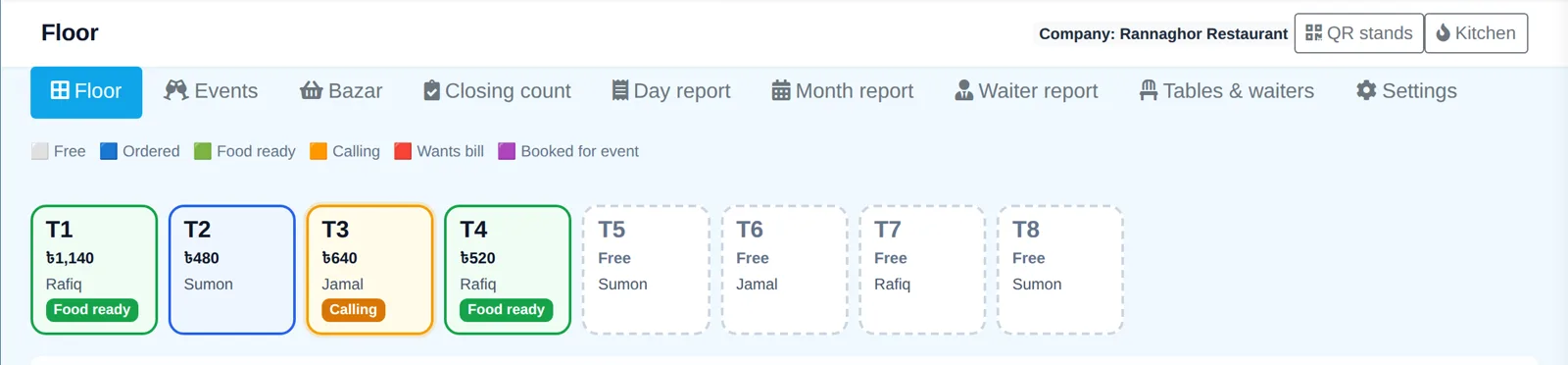
Waiters and the manager see every table at a glance
Free, ordered, food ready, calling the waiter or asking for the bill — the colour tells you. When food is ready the waiter’s phone is told. Moving a table, joining two tables on one bill and shift handover happen here too.
-
4
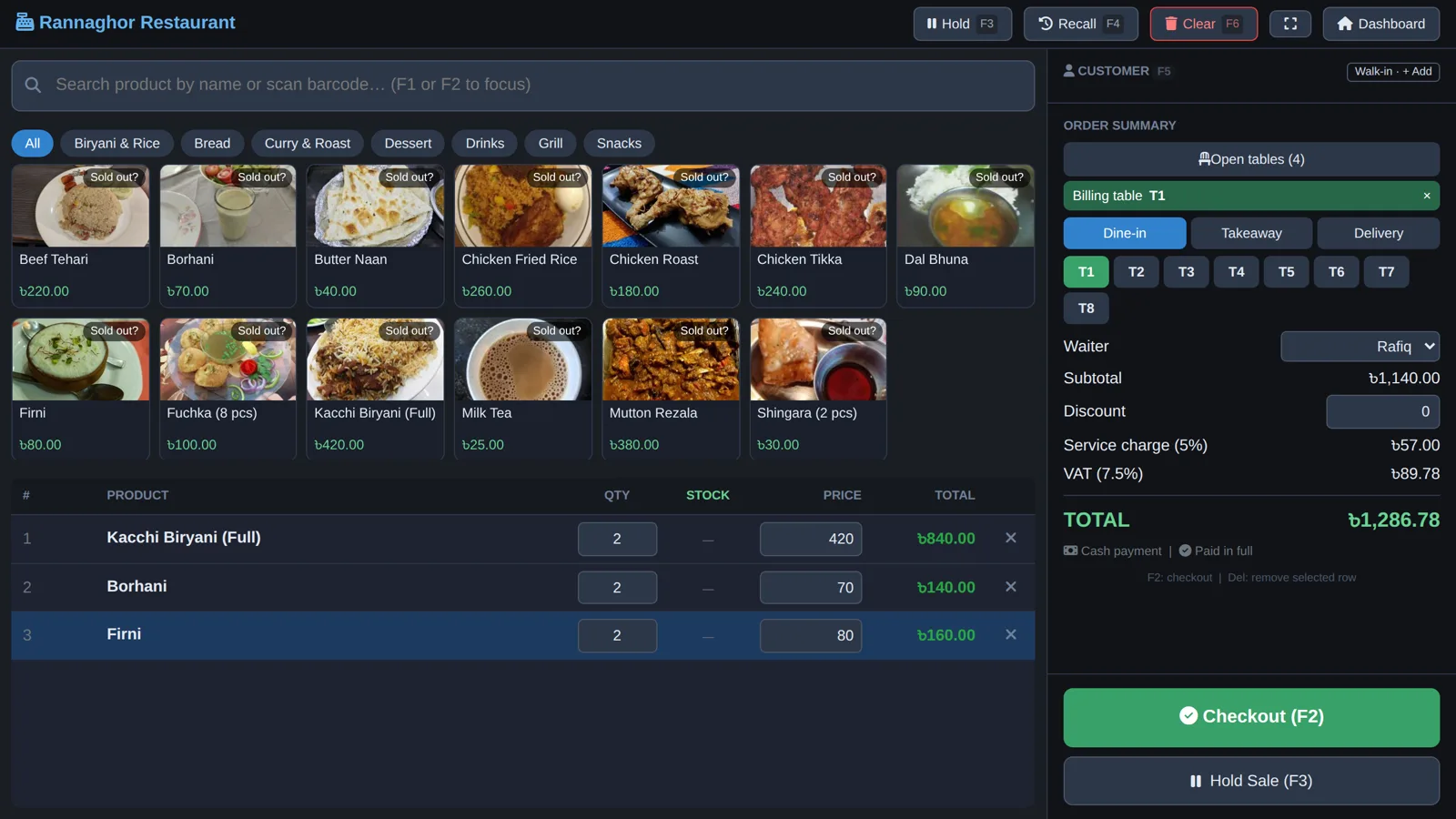
One tap to bill at the counter
The cashier picks the table from “Open tables” and the whole order drops into the bill. Service charge and VAT are worked out for you. Takeaway and delivery bills are made by tapping dish photos, and a kitchen ticket without prices can be printed.
-
5
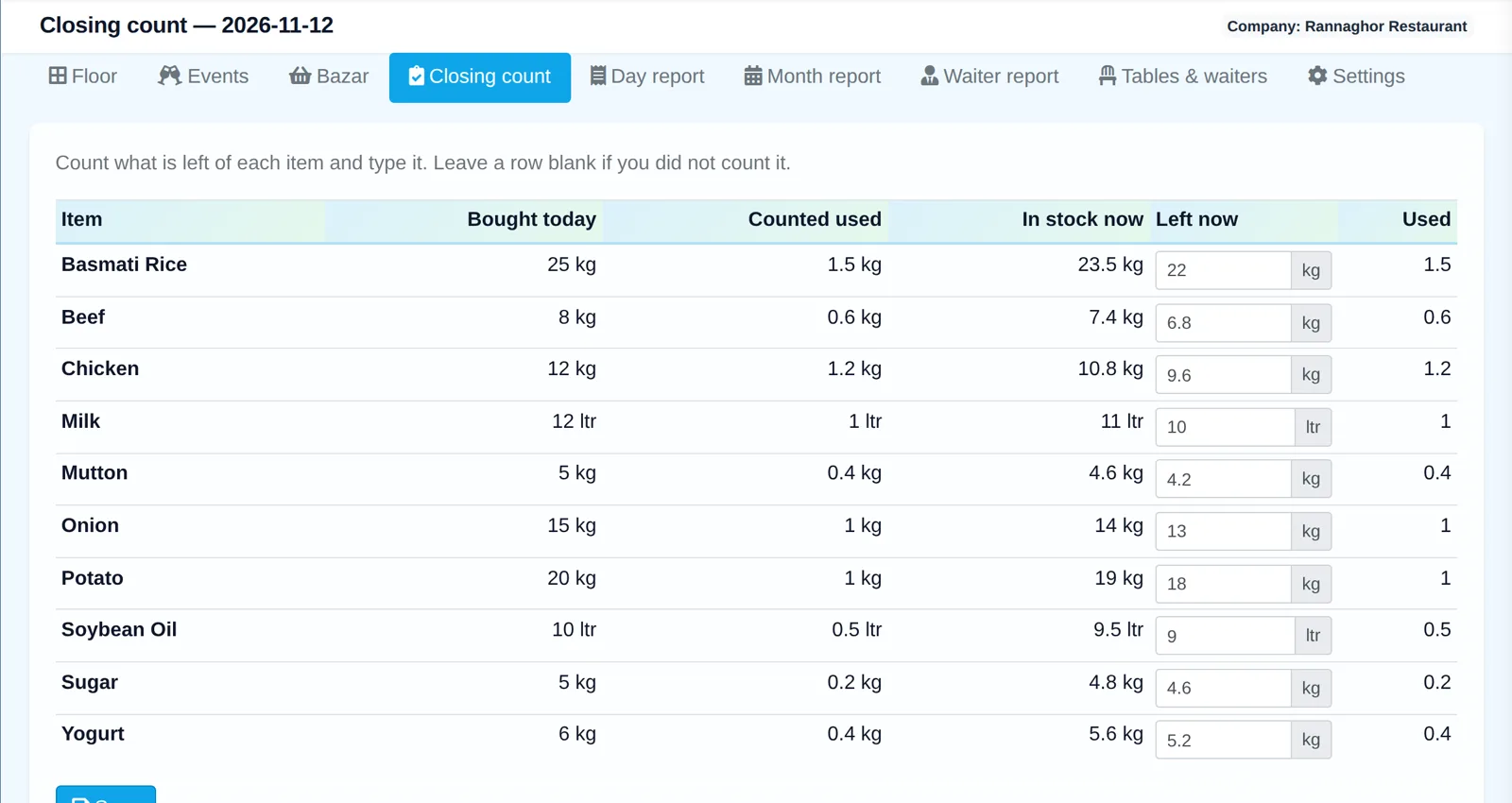
Enter the morning bazar, count what is left at night
In the morning, note what you bought at the bazar and what it cost. At closing, count what is left — rice, meat, oil. KarbarX works out what was used; no recipes or weighing every plate.
-
6
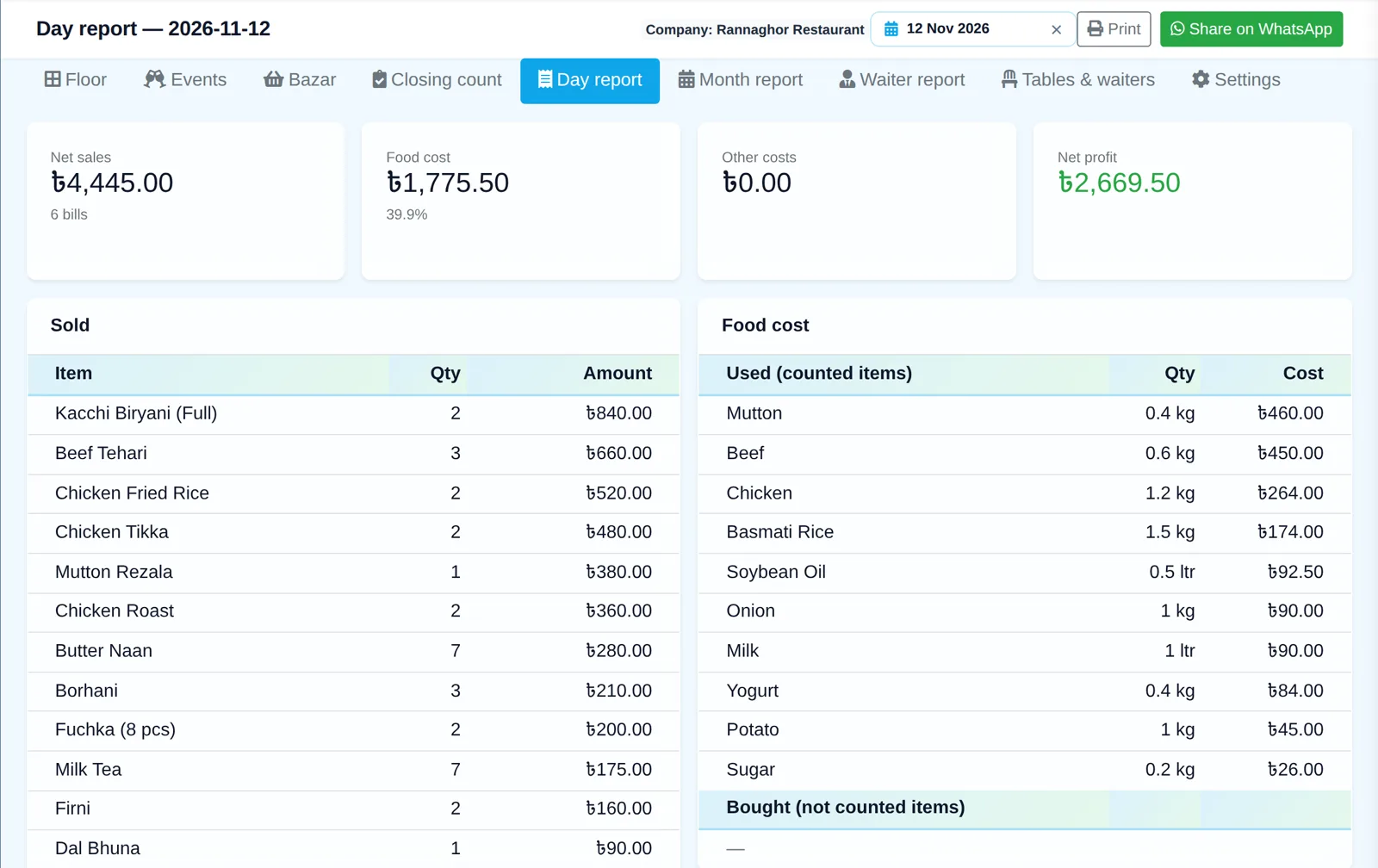
The day’s profit on one page
Today’s sales, how many of each dish went, the food cost, other costs and the day’s profit. One tap sends it to the owner’s WhatsApp; the month report shows which ingredient got dearer.
What it does for Restaurants & food shops
- Billing from a photo menuTap the dish photo to bill; switch a dish off the menu in one tap when it runs out.
- Service charge & VATService charge for dine-in and VAT on top — set the rates once and every bill works them out.
- Kitchen screen & ticketNew orders land on the kitchen screen with a beep; mark cooking and ready in one tap. A kitchen ticket without prices can be printed too.
- QR ordering at the tableGuests scan the table’s QR to see the menu, order, call the waiter or ask for the bill — no app needed.
- Tables & waitersSee which tables are free or busy; move a table, join two tables on one bill, hand tables over at shift change. Waiters see it on their own phone.
- Bazar & closing countEnter the morning bazar and count what is left at night — what was used is worked out for you.
- Day & month profitSales, food cost, other costs and the day’s profit; by month, which ingredient got dearer and which dish sold most.
- Event bookingBook a function with an advance, a per-head package or a menu, and a venue fee — billed as one invoice.
KarbarX for Restaurants & food shops
KarbarX is restaurant software for restaurants, food hotels and cafés in Bangladesh. The counter bills from a photo menu, service charge and VAT are worked out for you, and the kitchen gets a ticket without prices. Put a QR code on each table and guests order from their own phone; the order goes straight to the kitchen screen, and the waiter’s phone is told when the food is ready. Enter the morning bazar and the closing count, and every day you see what was sold, what the food cost and what the day earned.
What every shop gets
- Automatic due callsBangla calls from your own number; customers press a key to promise a date.
- Business health scoreA score out of 100, why it dropped and what to do today — in Bangla.
- Customer scoreWho pays on time and who doesn’t — shown while you make the memo.
- Accounts & day bookCash, bank, expenses, profit and loss — double-entry, automatically.
- Staff attendance & salaryQR attendance, salary and advances — in the staff’s own app.
- Speak in BanglaAdd memo lines, payments and customers by voice; ask the AI anything.
Also for
Common questions
Can guests order from their own phone?
Yes. Every table has its own QR code. Scanning it opens the menu and the order goes straight to the kitchen — nothing to install.
How do I make the QR codes for my tables?
Add your tables in the software and each one gets its own QR code. Print them all from the “QR stands” page and put them on the tables — no separate service or extra cost.
Does the kitchen need its own screen?
The kitchen screen opens in the browser of any phone, tablet or old computer. Without a screen, a kitchen ticket with no prices can be printed instead.
How is the day’s profit worked out?
The day’s sales, less food cost (from the bazar and the closing count) and other expenses. If the closing count is missing, the report says so.
Do VAT and service charge show separately on the bill?
Yes. Service charge applies to dine-in only and VAT is added on top; both print as their own lines.
How much does the software cost?
Plans start at ৳1,500 a month, and the first 7 days are free with no card. The pricing table shows the users, branches and memos each plan includes.
Is the software in Bangla?
Yes. Every screen, memo print and message works in Bangla or English, and you can switch at any time.
Can I use it on my phone?
Yes. It runs in the browser on a phone, tablet or computer — nothing to install.
Can I bring my old product list and customers?
Yes. You can import products from an Excel sheet yourself in one go. Or take the ৳10,000 one-time onboarding package: our team enters your products and customers, loads opening dues and trains your staff in two sessions — live within 7 days.
Lift the shutter
Your workspace is ready in a minute. Seven days free, no card — and we can set it all up for you.